

Feature image: A modern data flow for server-side tagging gtm. Images on this page are compressed for page speed.
Server-side tagging gtm: 17 Powerful ROI Wins
By Morne de Heer • Published by Brand Nexus Studios

If faster pages, cleaner data, and better attribution sound good, then server-side tagging gtm will feel like a superpower. It replaces slow, chatty third-party scripts with a secure tagging server you control, so you ship less JavaScript and collect more reliable events.
Here is the bottom line. Server-side tagging gtm improves Core Web Vitals, protects user privacy, and restores signal quality for GA4, Google Ads, and Meta. In this guide you will learn how it works, 17 ROI wins you can capture, and a step-by-step plan to launch it without drama.
What server-side tagging gtm actually means
Traditional tagging runs in the browser. Every vendor adds scripts, network calls, and cookies. Server-side tagging gtm moves most of that work to a tagging server hosted on your subdomain, turning heavy third-party requests into fast first-party traffic.
Instead of pushing data directly to vendors, the browser sends a lean event to your endpoint. The server container receives it, applies consent, enriches the payload, and forwards the event to downstream platforms. With server-side tagging gtm, you decide what leaves your domain and what gets trimmed or blocked.
This approach makes your tracking resilient. Ad blockers target known vendor domains, not your first-party subdomain. ITP and ETP reduce third-party cookies, not first-party cookies you manage. Server-side tagging gtm leverages that difference to keep measurement stable.
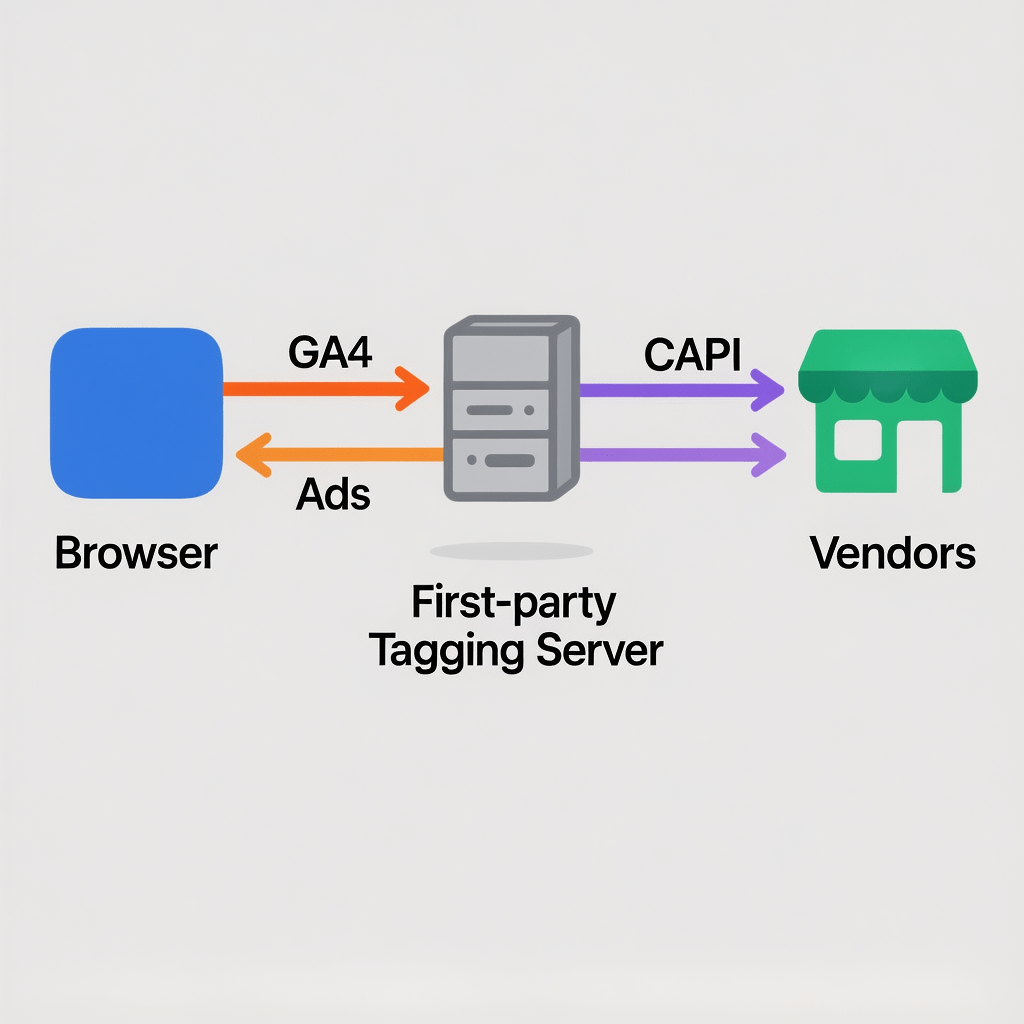
How server-side tagging gtm works under the hood
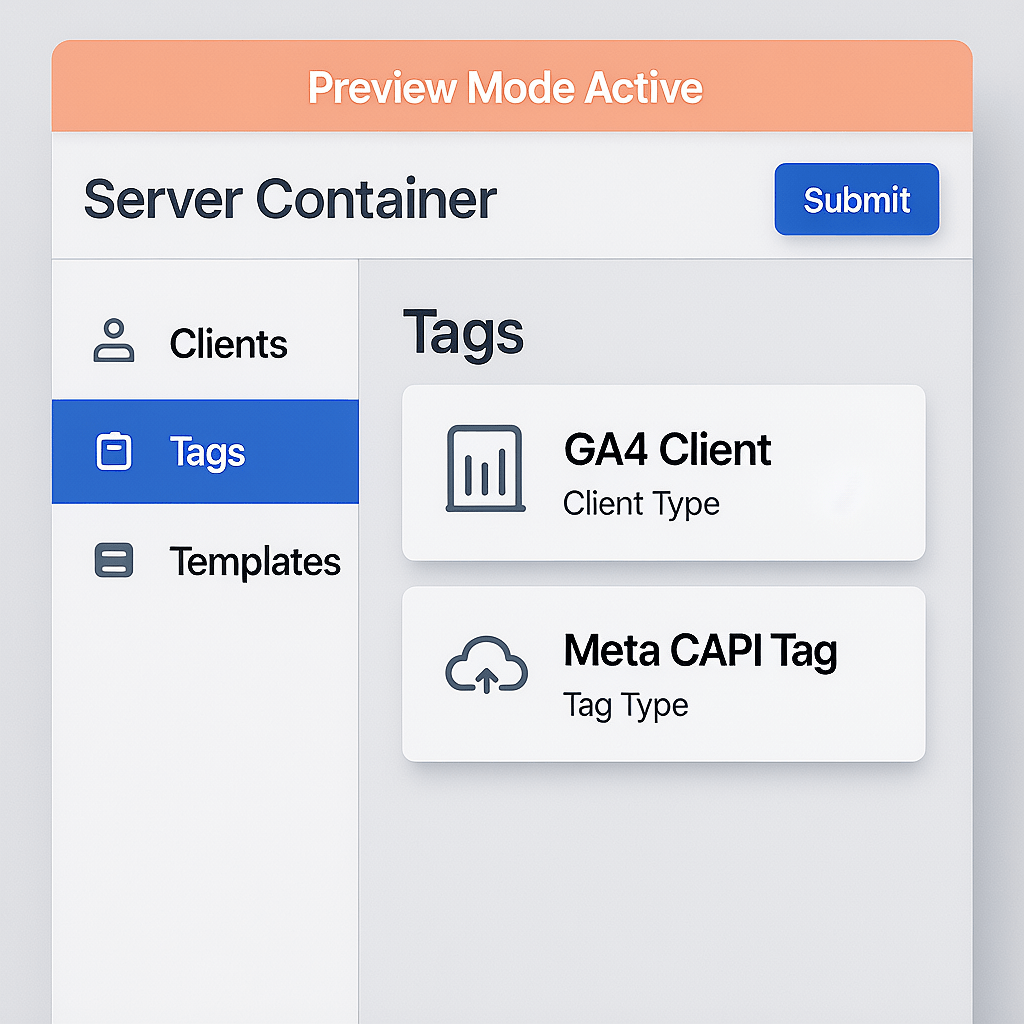
Think of the server container as a programmable gateway. Your web container sends events to tags.yourdomain.com. The server container runs clients that listen for formats like GA4 or vendor templates, transforms the payload, and dispatches cleaner events downstream.
With server-side tagging gtm, cookies can be set with the HttpOnly flag and longer lifetimes, within privacy rules. You can hash emails for Enhanced Conversions, enrich with CRM attributes, and normalize event names before they hit any vendor.
Because the server is yours, you can cache responses, collapse duplicate calls, and rate limit noisy sources. That reduces cloud egress, lowers costs, and speeds up delivery to vendors during traffic spikes.
17 Powerful ROI wins with server-side tagging gtm
1) Faster page loads and better Core Web Vitals
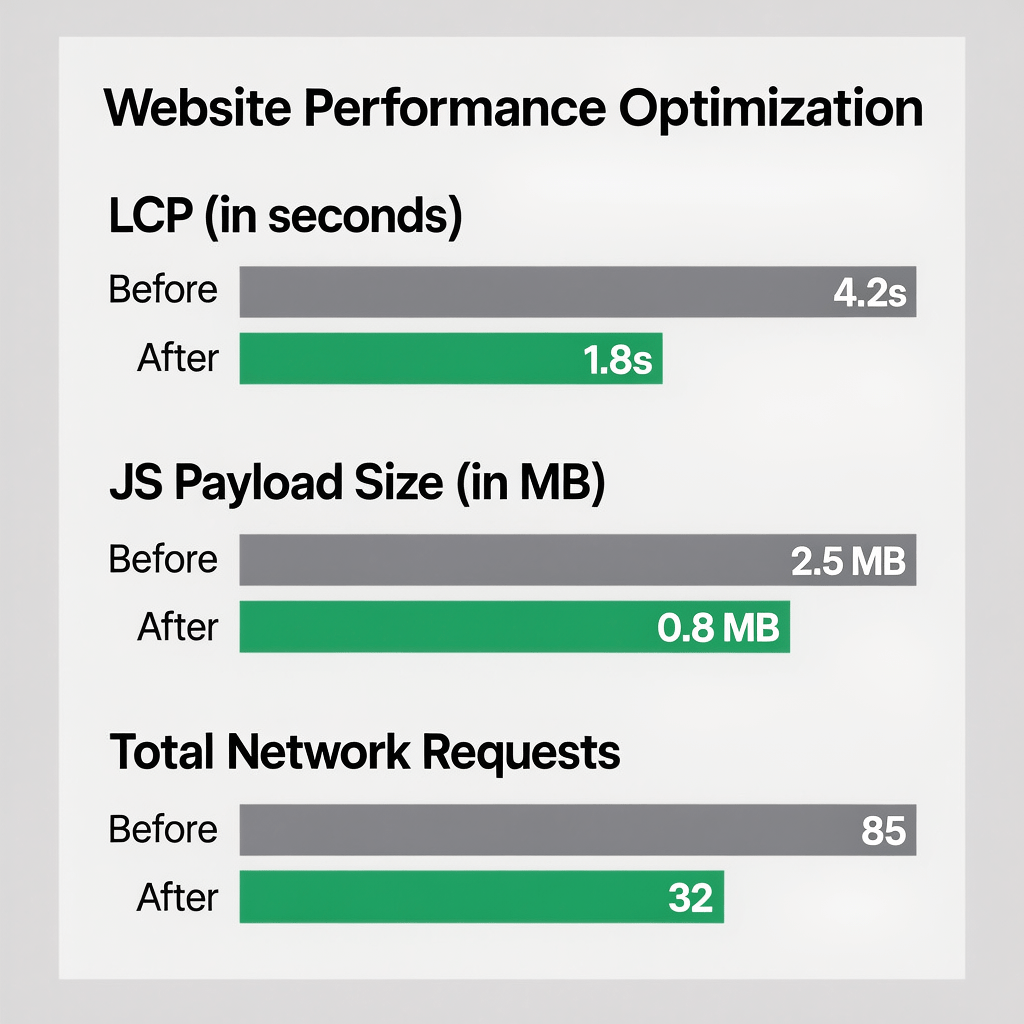
Reduce third-party scripts and shift network chatter off the main thread. Server-side tagging gtm cuts JS weight, shrinks TTFB variance, and reduces render blocking. Faster pages raise conversion rates and ad Quality Scores.
2) Higher data accuracy and event parity
Duplicate suppression, server timestamps, and deterministic IDs improve data quality. With server-side tagging gtm, your GA4 and paid media events agree more often, so decision quality improves too.
3) Stronger privacy and consent enforcement
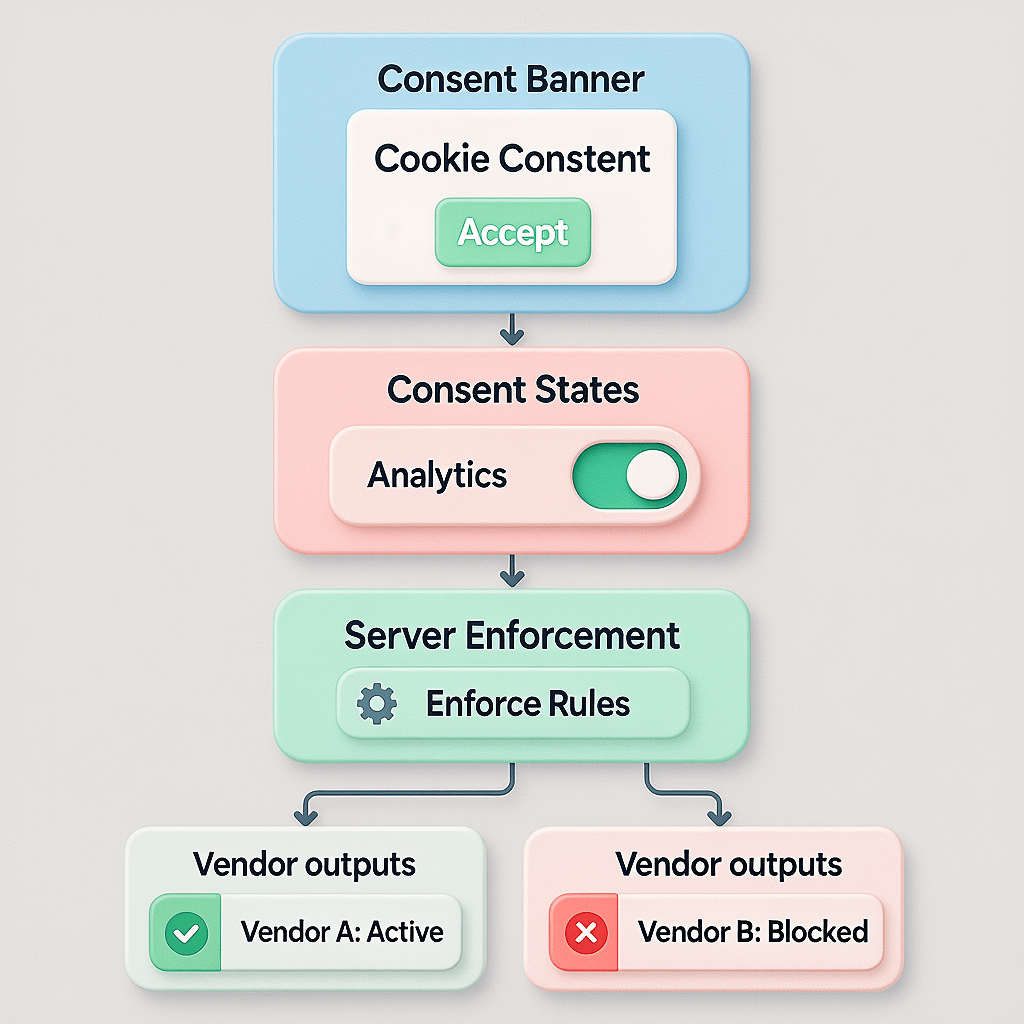
Map consent signals to the server container. Block vendor calls when consent is missing and strip identifiers if partial consent applies. Because server-side tagging gtm centralizes logic, audits and DPIAs become easier.
4) Resilience to ITP and ETP limits
First-party cookies set on your subdomain are more durable than third-party cookies. Server-side tagging gtm uses this to stabilize attribution windows while respecting consent policies and local regulations.
5) First-party subdomain control
Use tags.yourdomain.com for events and collectors. This keeps data in your namespace and reduces ad blocker matches. With server-side tagging gtm you choose TTLs, HttpOnly flags, and SameSite attributes.
6) Better attribution with Enhanced Conversions and CAPI
Hash emails, deduplicate events, and send reliable server hits to Google Ads and Meta. Server-side tagging gtm helps recover attributed revenue that client-only setups lose.
7) Lower vendor request counts
Collapse multiple browser calls into one event, then fan out from the server. Server-side tagging gtm strips unused parameters and removes noisy beacons, cutting vendor costs and timeouts.
8) Reduced ad blocker impact
Browsers regularly block known vendor endpoints. Your first-party endpoint is harder to block without breaking the site. Server-side tagging gtm regains critical signals for optimization.
9) Data enrichment and normalization
Join CRM flags, content taxonomy, or UTM standards on the server. With server-side tagging gtm you can normalize event names, fix casing, and standardize parameters for analytics and ads.
10) PII safety by design
Hash sensitive fields, drop accidental PII, and log only what is needed. Server-side tagging gtm puts you in control of payloads so you can meet privacy obligations without losing performance.
11) Cleaner vendor independence
Avoid vendor lock-in by routing through your server container. Server-side tagging gtm lets you switch downstream endpoints with fewer code changes on the website.
12) Scalable architecture with caching
Autoscaling and edge caching protect you during traffic spikes. Server-side tagging gtm works well with CDNs and reverse proxies to keep latency low and reliability high.
13) Observability and debugging
Preview mode and server logs reveal payloads and vendor responses. Server-side tagging gtm cuts diagnosis time because you can see and fix issues centrally.
14) Cost control and predictable billing
Optimize caching, sampling, and batching to reduce egress and compute. With server-side tagging gtm you pay for real value delivered, not wasted browser requests.
15) Future proof for cookieless marketing
As third-party identifiers fade, robust first-party tagging becomes the backbone of measurement. Server-side tagging gtm helps you adapt without losing targeting or reporting fidelity.
16) Better security boundaries
Fewer third-party scripts run on your pages, shrinking the attack surface. Server-side tagging gtm keeps secrets and tokens away from the browser.
17) Easier multi-brand and multi-region governance
Centralize rules for redaction, consent, and vendor routing. Server-side tagging gtm makes complex org setups manageable and auditable.
Implementation blueprint for server-side tagging gtm
You can roll this out in a few focused sprints. Below is a practical plan that any growth team can follow. Keep QA tight and ship in phases so you never risk revenue.
1. Choose your hosting model
Most teams start with managed cloud like App Engine or Cloud Run. You get autoscaling, HTTPS, and simple updates. Server-side tagging gtm benefits from predictable performance, so avoid underpowered instances.
2. Create the server container
In GTM, add a new server container. Use the guided deploy to provision the service. With server-side tagging gtm, this container becomes your tracking gateway and audit layer.
3. Map a first-party subdomain
Create tags.yourdomain.com. Point DNS to the service address, add SSL, and enable HSTS. Server-side tagging gtm works best when your endpoint is clearly first party.
4. Add clients and templates
Enable the GA4 client, then install templates for Google Ads, Meta CAPI, and any other vendors. Server-side tagging gtm relies on clients to parse incoming payloads before running tags.
5. Update the web container to use your endpoint
Point GA4 and vendor tags at your new URL instead of direct vendor endpoints. With server-side tagging gtm you keep browser code light and delegate fan-out to the server.
6. Implement consent mapping
Forward consent state and enforce blocking rules server side. Server-side tagging gtm can anonymize IPs, drop ad personalization flags, and respect Consent Mode v2.
7. Enrich, hash, and deduplicate
Add server timestamps, hash emails for Enhanced Conversions, and dedupe events using event IDs. Server-side tagging gtm improves attribution quality with consistent event identities.
8. Optimize caching and compression
Return compressed responses and cache templates to reduce cold starts. Mention that images are compressed for page speed across your site, and pair server-side tagging gtm with CDN caching for reliable performance.
9. QA in preview mode
Use preview to validate payloads and vendor responses. With server-side tagging gtm you can see each hop, which makes regression checks painless.
10. Launch in phases
Start with GA4 and one paid channel, then expand. Server-side tagging gtm supports gradual rollouts so you never risk key conversions during the switch.

Common mistakes to avoid with server-side tagging gtm
- Forgetting to change web container endpoints so events never reach the server.
- Double counting by sending both client and server hits without deduping.
- Not mapping consent signals, which triggers compliance and data quality issues.
- Leaking PII in logs or forwarding raw identifiers to vendors.
- Skipping DNS, SSL, or HSTS hardening on your subdomain.
- Overaggressive caching that returns stale responses for dynamic tags.
- No alerting for vendor failures, which hides drops in conversion uploads.
A tight QA loop prevents nearly all of these. Server-side tagging gtm gives you visibility and control, so use it to set guardrails before launch.
Costs, performance, and ROI modeling
Cloud costs scale with traffic, not page count. Small sites usually spend $15 to $50 a month. Mid-market brands range from $50 to $200. Server-side tagging gtm often pays for itself with conversion gains and reduced wasted spend.
Model two outcomes. First, a speed lift that improves conversion rate and Quality Score. Second, attribution recovery through Enhanced Conversions and CAPI. Server-side tagging gtm typically improves modeled ROAS because more conversions are matched.
Keep a close eye on caching, autoscaling min instances, and vendor retries. With server-side tagging gtm you can tune resources to keep latency low while holding costs steady.
Security, privacy, and compliance best practices
Make privacy a feature, not an afterthought. Server-side tagging gtm is ideal for consent-aware pipelines that respect GDPR and POPIA while keeping analytics useful.
- Hash emails with SHA-256 and add a pepper stored outside the container.
- Strip IPs or apply geo based anonymization based on consent state.
- Implement data retention windows and purge schedules.
- Use least privilege IAM and rotate secrets on a calendar.
Add a PII firewall. Server-side tagging gtm lets you define blocklists and field transformers so sensitive data never leaves your domain in clear text.
Migration checklist to server-side tagging gtm
- Inventory all browser tags and classify by purpose, vendor, and data fields.
- Define your first-party subdomain and obtain the TLS certificate.
- Create the server container and enable the GA4 client.
- Point GA4 web tags to the new endpoint and validate event parity.
- Implement Meta CAPI and Google Ads Enhanced Conversions via the server.
- Map consent and build redaction rules for PII and ad personalization flags.
- Set caching, compression, and logging levels that match traffic patterns.
- Run a two week shadow test, compare numbers, then cut over gradually.
Follow this plan and server-side tagging gtm becomes a smooth upgrade rather than a risky rebuild.
KPIs to track after launch
- Core Web Vitals: LCP, CLS, and JS payload size per page.
- Event delivery: success rate, retries, and vendor response times.
- Attribution lift: matched conversions in Ads and Meta.
- Privacy compliance: consent coverage and blocked event counts.
- Cloud costs: egress, compute hours, and cache hit ratio.
Tie KPIs to business goals, not just tech metrics. With server-side tagging gtm, the goal is more efficient growth, not only pretty graphs.
When to call in specialists
Complex stacks, high traffic, or strict compliance needs benefit from expert help. At Brand Nexus Studios SEO services, we pair server-side tagging gtm with search performance to raise ROI without sacrificing privacy.
If your site needs a subdomain strategy, CDN tuning, or code refactors, our website design and development team can align build quality with measurement goals so your stack pulls together.
Finally, to prove value quarter over quarter, our analytics and reporting practice sets targets, monitors drift, and keeps your server-side tagging gtm investment accountable.
FAQS on server-side tagging gtm
You asked, we answered. Here are the most common questions teams raise before making the switch.
Is a server container required for every brand or market?
You can run one container per brand and route based on domain, or separate per market for regulatory reasons. Server-side tagging gtm supports both patterns.
How do I prevent double counting during migration?
Use event IDs and deduplication rules. Keep a short shadow period where client and server events run together, then disable legacy client tags. Server-side tagging gtm preview helps verify parity.
Will my data warehouse benefit?
Yes. Cleaner server payloads feed better event streams to your warehouse. Server-side tagging gtm also makes it easier to normalize schemas across brands.
What about mobile apps and hybrid stacks?
App SDKs can send events to your endpoint via Measurement Protocol or SDK plugins. Server-side tagging gtm can unify app and web streams with consistent identity rules.
How does this impact cookie consent banners?
No change to the UI is required. Just pass consent state to the server container and enforce it there. Server-side tagging gtm ensures vendors receive the right signals.
Can I still A/B test?
Yes. Keep experiment logic in the app, include variant IDs in payloads, and route to analytics and ads from the server. Server-side tagging gtm preserves test fidelity.
How do I keep cloud costs reasonable?
Enable caching, set reasonable autoscaling minimums, and remove unneeded vendor calls. Server-side tagging gtm pays off when you tune for efficiency.
References
About the Author




